
Point to Point Wireless Bridge
KNECT Endpoint Pair (KEP-202)
The KNECT Point to Point solution is a wireless bridge capable of reliably transmitting both Wiegand and OSDP data over 25+ miles (line of sight) using two KNECT Endpoints.
Before You Begin
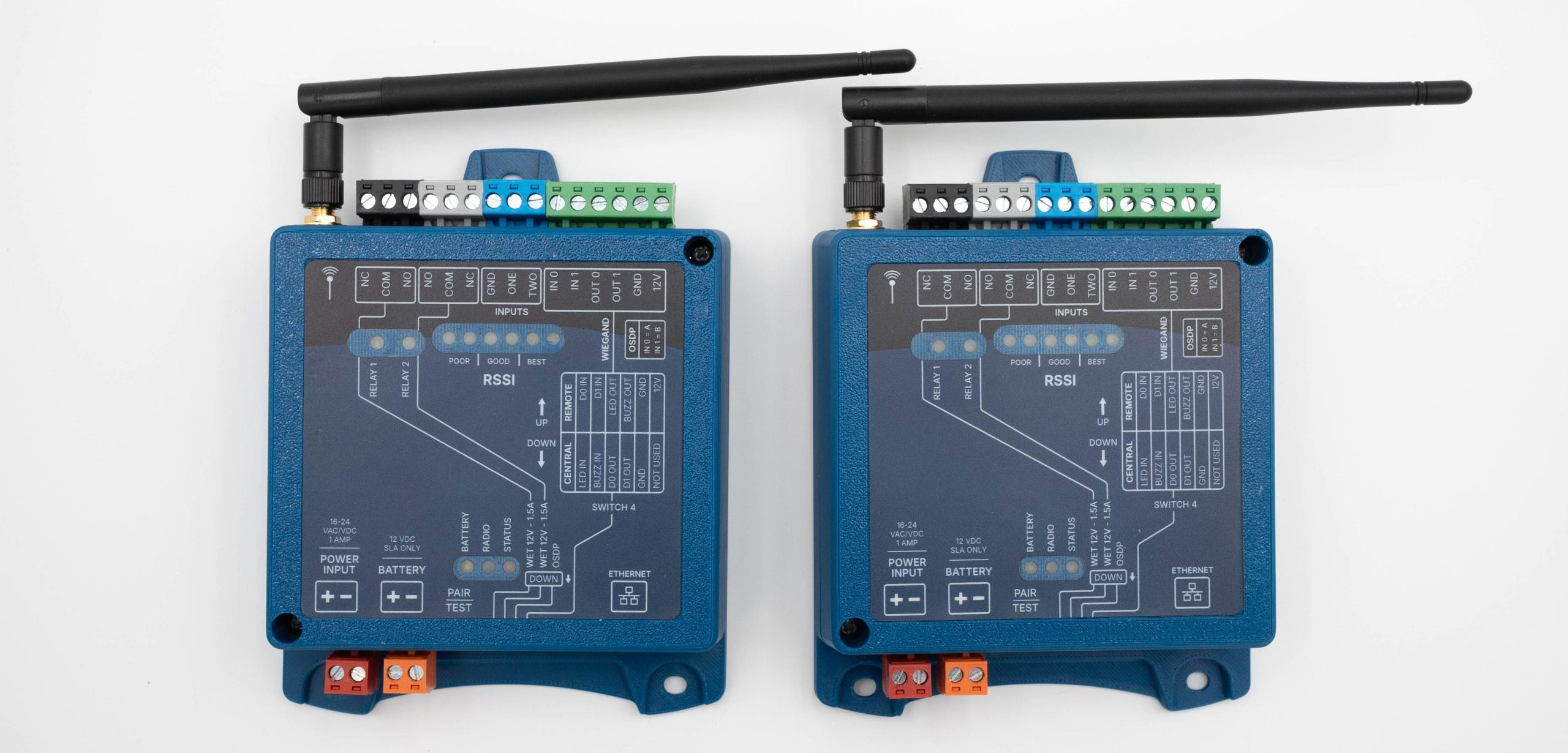
The KNECT Point to Point system is a wireless bridge system consisting of two KNECT Endpoints (KEP-200): a Central Unit and a Remote Unit.
Before installation designate one unit to be your Central unit (connected to main access control) and indicate the other unit will be your Remote unit (access point device).
It is recommended that the system be onboarded into the Aether RF IoT cloud platform in order to obtain detailed insights on device performance.
If your organization is not already registered, it is recommended you do so at AetherRFiot.com/register/dealer before proceeding with the installation.
DEVICE OVERVIEW
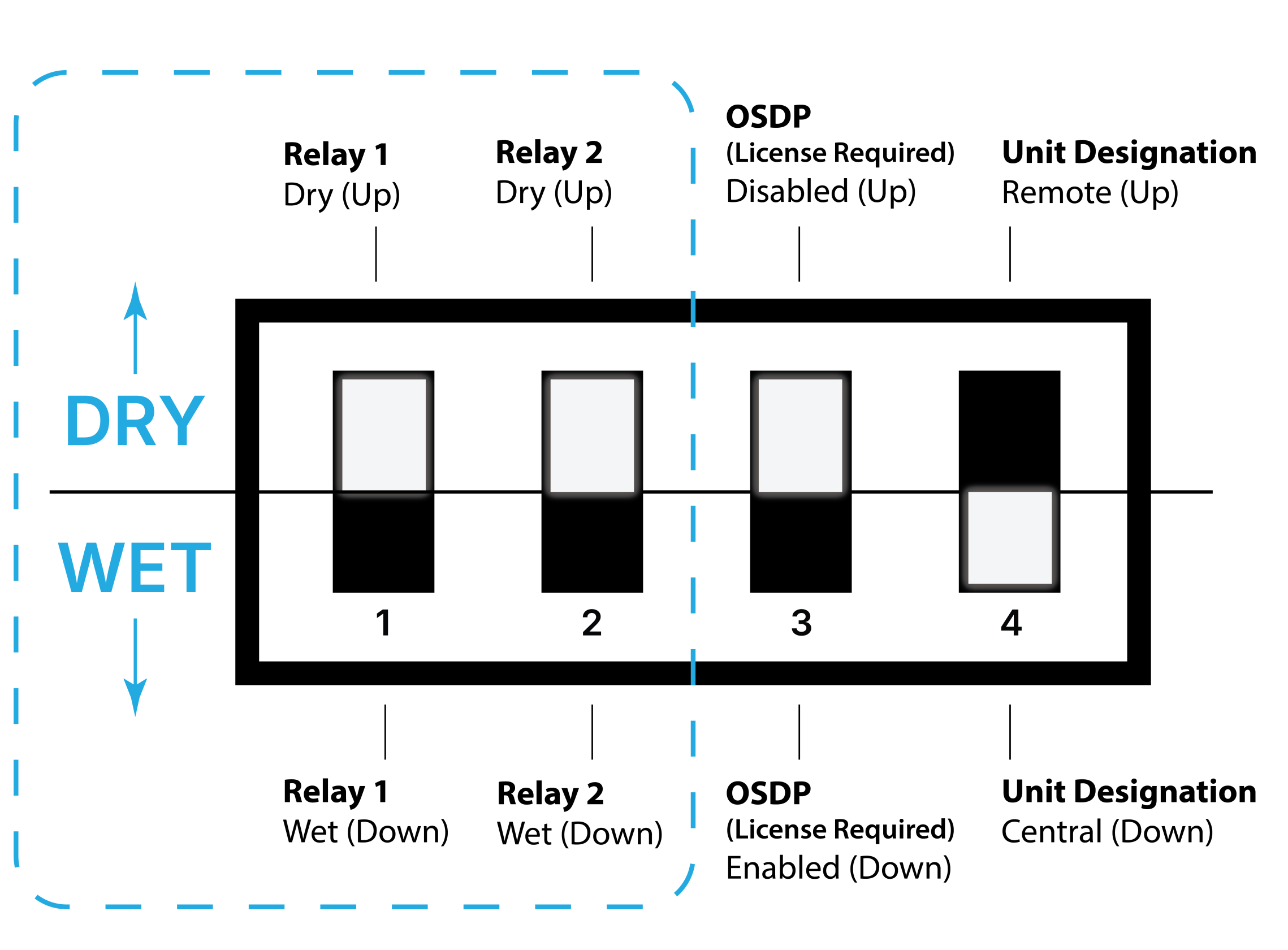
DIP SWITCHES
Each device has specific dip switch combinations for various use cases. Ensure devices have the correct dip switch configuration for your intended use.
RSSI & OTHER LED’S
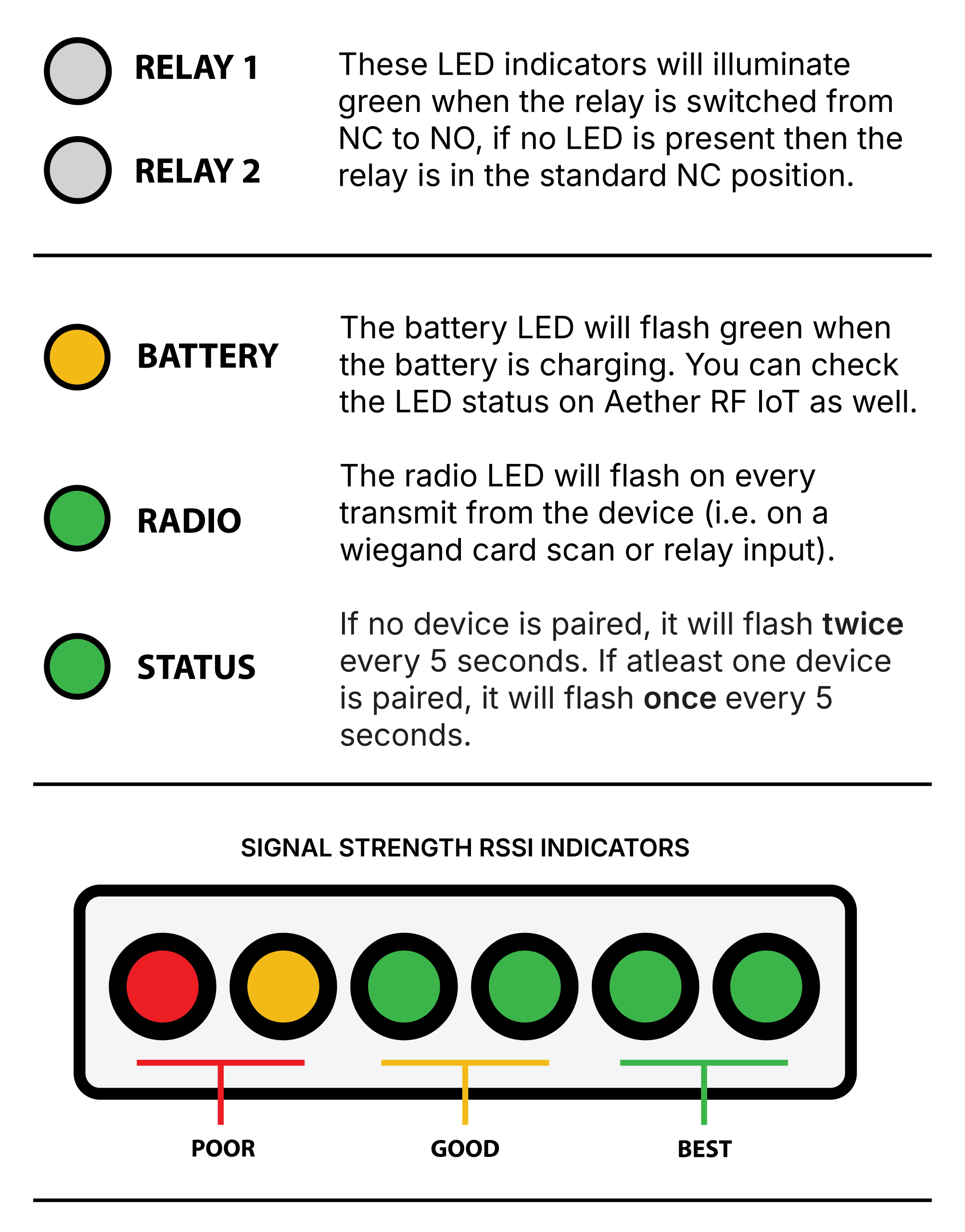
Each device has various LEDs to signal specific operating states, or performance insights. Understanding the main LED behaviors will improve both installation and troubleshooting.
MOUNTING CONSIDERATIONS
Before mounting, ensure the antenna is tight enough and doesn’t fall or swing freely in any position.
Mount the unit in an area where the antenna has a mostly-unobstructed airway, preferably high and near an exterior wall or window if mounted indoors.
The antenna should be straight and pointed up for maximum performance.
⚠ The KNECT Endpoint is NOT water resistant. ⚠
POWER
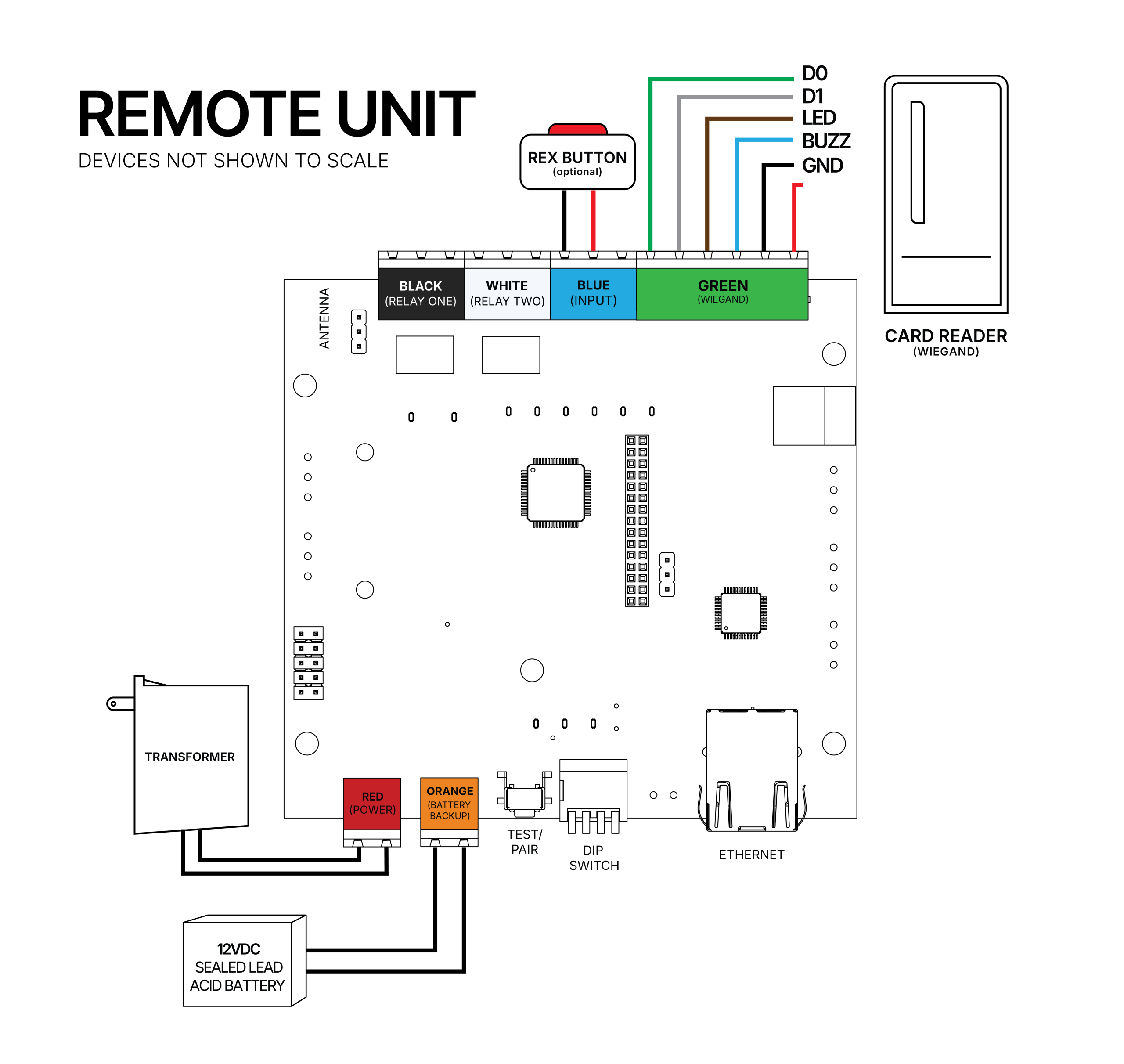
Connect 16-24VAC/VDC power to the RED terminal block on both units.

WIRING
NOTE: BOTH UNITS (Central and Remote) ARE NOT WIRED IDENTICALLY. PLEASE FOLLOW WIRING INSTRUCTIONS CAREFULLY.
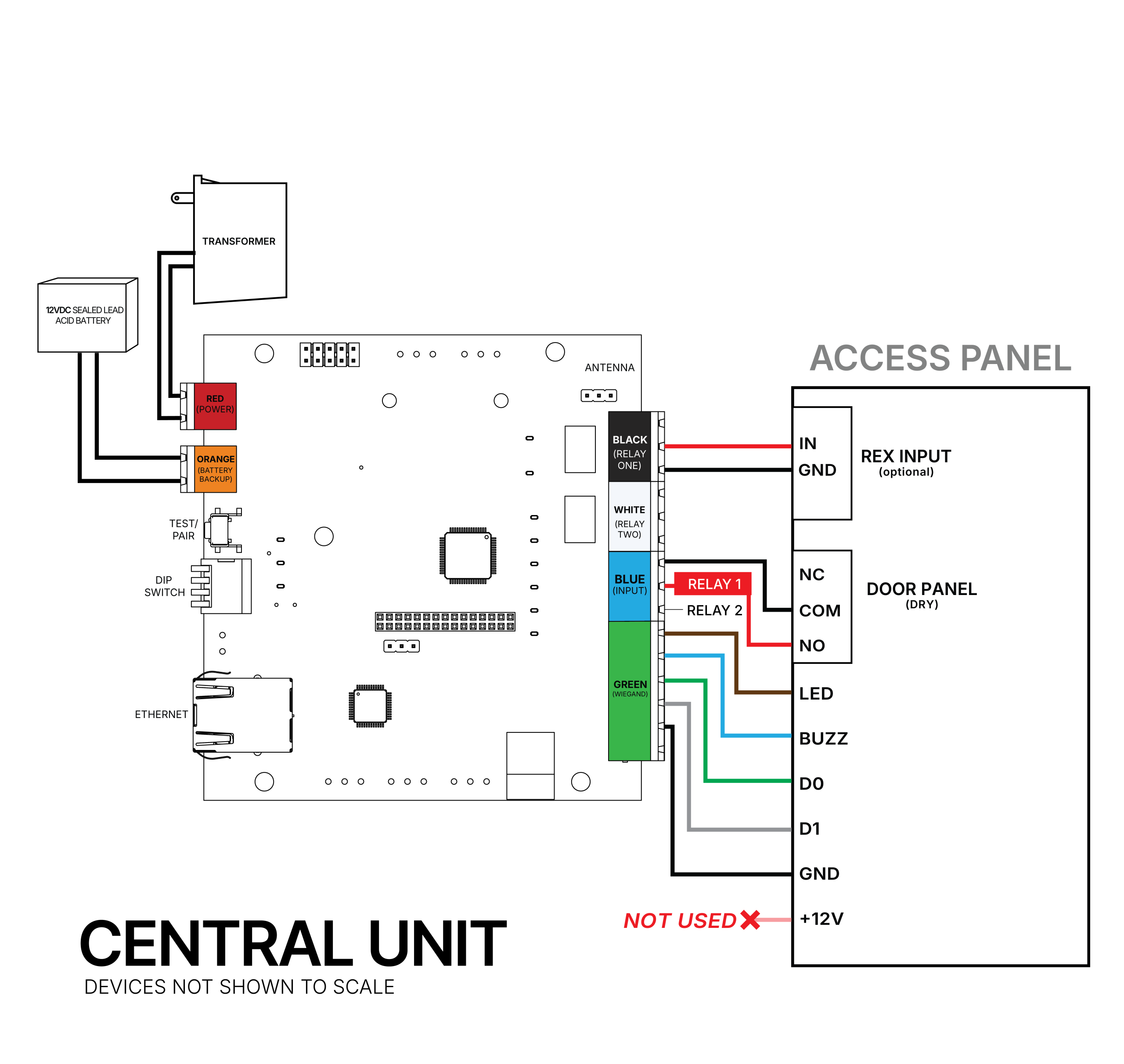
CENTRAL UNIT WIRES TO CONTROL PANEL
GREEN TERMINAL – WIEGAND: 12V, Ground, Data 1, Data 0, LED (IN 1), Buzzer Control (IN 0)
BLUE TERMINAL – INPUTS: Input 2, Input 1, Ground
WHITE TERMINAL – AUX: Normally Open, COM, Normally Closed
BLACK TERMINAL – RELAY: Normally Open, COM, Normally Closed
REMOTE UNIT WIRES TO ACCESS POINT
GREEN TERMINAL – WIEGAND (CARD READER): 12V, Ground, Data 1, Data 0, LED (IN 1), Buzzer Control (IN 0)
BLUE TERMINAL – INPUTS (REX MOTION, DOOR POSITION): Input 2, Input 1, Ground
WHITE TERMINAL – AUX: Normally Open, COM, Normally Closed
BLACK TERMINAL – RELAY: Normally Open, COM, Normally Closed
Wiring to Ethernet
If you intend to utilize the cloud based monitoring features for your Point to Point system, you’ll need to connect your Central Unit to Ethernet. It is not necessary to connect the Remote Unit to Ethernet.
PAIRING AND UNPAIRNG DEVICES
TO PAIR
It’s recommended to have both Endpoints in close proximity for pairing, but is not required.
- Ensure devices are connected to power.
- Set one device to Remote using Dip Switch #4
- Set the other device to Central using Dip Switch #4
- Power cycle both devices by unplugging from the power source for 30–60 seconds, then plugging back in.
- RSSI LEDs will light up on the Central unit once the Remote device starts transmitting.
- Quickly press the Test/Pair button on the Central. The two devices will transmit back and forth 6 times, the RSSI lights should light up on each device.
- Once the devices stop transmitting pairing is complete
Once successfully configured and paired, the units will communicate every 30 seconds. The RSSI LEDs will indicate signal strength between the two units.
TO UNPAIR AND FACTORY RESET
- Move ALL DIP switches to the UP position on both units.
- Hold the green Test / Pair button on both units until the Radio and Status LEDs stay solid for 5 seconds.
Once the LEDs have shown solid, the devices have been unpaired and restored to their factory settings.
FUNCTIONAL TESTING
Set up has been completed correctly when the Status LED flashes once every 5 seconds to indicate proper pairing. If the Status LED is still flashing twice, it has not been paired properly.
Press and release the Test/Pair button to send a test radio transmission. If both devices are paired and within range, each device will show an RSSI reading, indicating the signal strength for the current distance between the devices.
FCC Regulatory Statement
Contains FCC IDs: 2BGQ6KM100A and X8WBT840F
This device complies with part 15 of the FCC rules.
Operation is subject to the following two conditions: (1) This device may not cause harmful interference, and (2) this device must accept any interference received, including interference that may cause undesired operation.
⚠ IMPORTANT! Any changes or modifications not expressly approved by the party responsible for compliance could void the user’s authority to operate this equipment.
NOTE: This equipment has been tested and found to comply with the limits for a Class B digital device, pursuant to part 15 of the FCC Rules. These limits are designed to provide reasonable protection against harmful interference in a residential installation. This equipment generates, uses and can radiate radio frequency energy and, if not installed and used in accordance with the instructions, may cause harmful interference to radio communications. However, there is no guarantee that interference will not occur in a particular installation. If this equipment does cause harmful interference to radio or television reception, which can be determined by turning the equipment off and on, the user is encouraged to try to correct the interference by one or more of the following measures:
- Reorient or relocate the receiving antenna.
- Increase the separation between the equipment and receiver.
- Connect the equipment into an outlet on a circuit different from that to which the receiver is connected.
- Consult the dealer or an experienced radio/ TV technician for help.
FCC Radiation Exposure Statement
This equipment complies with FCC radiation exposure limits set forth for an uncontrolled environment. This equipment should be installed and operated with minimum distance 20cm between the radiator and your body.
This transmitter must not be co-located or operating in conjunction with any other antenna or transmitter. The antennas used for this transmitter must be installed to provide a separation distance of at least 20 cm from all persons and must not be co-located or operating in conjunction with any other antenna or transmitter.
FCC Caution
To assure continued compliance, any changes or modifications not expressly approved by the party responsible for compliance could void the user’s authority to operate this equipment. (Example – use only shielded interface cables when connecting to computer or peripheral devices).