
Wiegand Wave 150
Wireless Wiegand bridge
Gets a reader onto a door or gate your access panel can't reach, without trenching or new conduit. Wiegand readers only, and no cloud connection.
You need two units for one door or gate.
One wires to the access panel and the other goes out at the reader. Buy the pair, or buy two singles.
A complete bridge for one door or gate
2 units · 2 power supplies · 2 antennas
Replaces one unit in a pair
1 unit · 1 power supply · 1 antenna
Buy direct, or through your distributor.
Order Wiegand Waves straight from Aether, or pick them up from the branch you already buy through.
Two-year limited warranty. Assembled in the USA. Sold direct and through authorized distributors.
Wiegand Wave 150 or KNECT Endpoint
Same hardware, same radio, so the distance you get is the same. The difference is which readers each one works with, and whether you can check the site from your desk afterward.
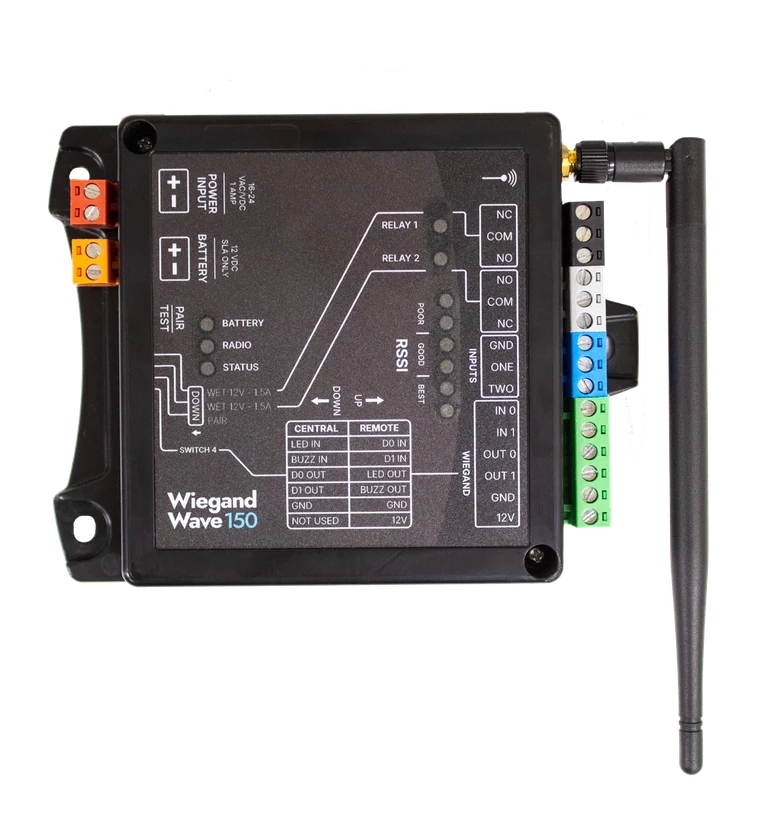
Wiegand Wave 150
WW150 single · WW152 pair
| Readers | Wiegand, 4 to 64 bit |
|---|---|
| Ethernet port | None |
| Aether RF IoT portal | Can't be claimed |
| Radio | 902 to 928 MHz, 50 channels |
| Price | The lower of the two |
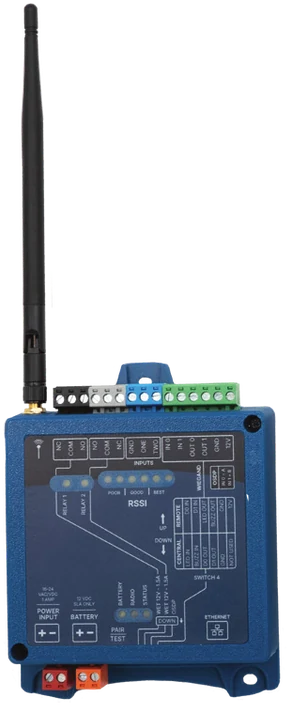
KNECT Endpoint
KEP-200 single · KEP-202 pair · KEP-203 in an enclosure
| Readers | Wiegand, 4 to 64 bit, or OSDP |
|---|---|
| Ethernet port | One on every unit |
| Aether RF IoT portal | Can be claimed |
| Radio | 902 to 928 MHz, 50 channels |
| Price | The higher of the two |
Order an Endpoint if the readers are OSDP
The Wiegand Wave 150 works with Wiegand readers only, and no part adds OSDP to it. A KNECT Endpoint takes Wiegand or OSDP.
Order an Endpoint if you want the site on the portal
The Wiegand Wave 150 has no Ethernet port, so it can't be claimed to the Aether RF IoT portal. If you want to check a site from your desk, or sell monitoring as a service, that job is a KNECT Endpoint too.
Central and Remote: same unit, different wiring
The two units in a pair are identical. The one wired to the access panel is the Central unit, and the one out at the door or gate is the Remote. Each role uses its own terminals, and both wiring diagrams are printed on every unit.
- Central
- At the access panel. The panel sees the reader the same way it would over a wire
- Remote
- At the door or gate, wired to the reader and the lock. It can power the reader from its 12V terminal
- Relays and inputs
- A contact closure on one unit's input triggers the matching relay on the other
- Role
- Set by DIP switch 4. Down for Central, up for Remote
Where the antenna goes matters more than the distance
Most jobs run 500 to 2,000 feet through obstructions. Two pairs the same distance apart can perform very differently, depending on what's between them and where each unit is mounted.
Poor
1 to 2 LEDs lit
Move an antenna before you leave.
Good
3 to 4 LEDs lit
Best
5 or more LEDs lit
Mount each unit high, with a mostly clear path toward its partner, and near an exterior wall or window if it's indoors. Once the pair is linked, the signal LEDs on the face relight every 30 seconds, so you can read the link before the ladder comes down.
Set it up from the face of the unit
The wiring for both roles and the switch legend are printed on the unit itself, so the one in your hand is the reference.
| Central | Remote |
|---|---|
| LED IN | D0 IN |
| BUZZ IN | D1 IN |
| D0 OUT | LED OUT |
| D1 OUT | BUZZ OUT |
| GND | GND |
| Not used | 12V |
| Switch | Up | Down |
|---|---|---|
| 1, relay 1 | Dry | Wet |
| 2, relay 2 | Dry | Wet |
| 3, pairing | Normal | Pairing |
| 4, role | Remote | Central |
What a Wiegand Wave connects to
It goes between your access panel and a Wiegand reader you've already chosen. Your panel and your reader stay as they are.
- Readers
- Any Wiegand reader, 4 to 64 bit. OSDP readers need a KNECT Endpoint
- Panels
- Cloud or on-premise. The panel reads the credential the same way it would over a wire
- Relays
- Two per unit, wet or dry, 1.5A at 12VDC, plus two contact inputs
- Power
- 15 to 24 volts, AC or DC, with a terminal for a 12V sealed lead acid battery
When to use a Wiegand Wave 150
Use a Wiegand Wave when
- You've got one Wiegand reader where the wire doesn't reach.
- Remote monitoring isn't part of the job, and the lower price matters more.
- You're replacing one unit of a pair that's already in service.
Use something else when
- The readers are OSDP. That job is a KNECT Endpoint.
- You want the site on the Aether RF IoT portal, or you sell monitoring as a service. That's an Endpoint too.
- More than one door or gate runs off the same access panel. A One to Many Kit puts them all on one system, with a single connection at the panel.
- There's no access panel, or the one on site is being replaced. That job is KNECT Core Access.
Specifications
Keep the antenna out of metal
A Wiegand Wave isn't water resistant, so outdoors it goes in a weatherproof box. What matters for the radio is the antenna. It can't be shut inside metal.
Plan the power
15 to 24 volts, AC or DC, to the red terminal on each unit. There's an orange terminal for a 12V sealed lead acid battery if it has to keep working through an outage.
Radio
| Band | 902 to 928 MHz |
|---|---|
| Channels | 50, frequency hopping |
| Topology | One Central unit paired to one Remote unit |
Protocols and outputs
| Protocols | Wiegand, 4 to 64 bit |
|---|---|
| Relays | Two, NO / NC / COM. Dry, or wet at 12VDC, 1.5A maximum |
| Inputs | Two contact-closure inputs, each triggering a relay on the paired unit |
| Ethernet | None. A Wiegand Wave can't be claimed to the portal |
Power
| Operating voltage | 15 to 24 volts, AC or DC |
|---|---|
| Draw | 64mA idle, 159mA transmitting |
| Operating power | 2.6 W peak |
| Battery | Terminal for a 12V sealed lead acid, 13.6V maximum at standby |
Physical
| Overall | 5.7 by 4.4 in, without the antenna |
|---|---|
| Mounting holes | Two, 3.4 in apart, at one end. One on the tab at the other end, 5 in away |
| Antenna | 5.6 in long, screws on, one included per unit |
Setup and ordering
| Pairing | DIP switches and the Pair/Test button on each unit. No software |
|---|---|
| Role | DIP switch 4. Down for Central, up for Remote |
| Signal check | Six signal LEDs on the face, from poor to best |
| Ordering | WW150 single, WW152 pair |
Questions installers ask
Does the Wiegand Wave 150 do OSDP?
No. Wiegand only. If the reader is OSDP you want a KNECT Endpoint, which takes Wiegand or OSDP.
How is it different from a KNECT Endpoint?
Same hardware, same radio, so they reach the same distance. The Endpoint adds OSDP and an Ethernet port, so you can claim it to the Aether RF IoT portal and check it from your desk.
Do I need two of them?
Yes. One unit at the access panel and one out at the door or gate. Buy the pair, or buy two singles.
Can I put it on the Aether RF IoT portal?
No. A Wiegand Wave has no Ethernet port, which is how an Endpoint reaches the portal. Endpoints can be claimed.
How do I pair the two units?
On the units themselves, with the DIP switches and the Pair/Test button. No software and no laptop. The install guide walks through it.
What's in the box?
One unit, its power supply and its antenna. A working bridge takes two units, so order the WW152 pair or two WW150 singles.
Where to buy a Wiegand Wave
Order direct from Aether, or through a security distributor you already have an account with. Same hardware and the same two-year warranty either way.
Order direct
No account needed. Ships from Phoenix.
- PairWW152OrderTwo units, two power supplies and two antennas. A complete bridge for one door or gate
- SingleWW150OrderOne unit, its power supply and antenna, to replace one unit in a pair
Have questions? Contact us about your order.
Through a distributor
On your account. Picked up at the counter.
- Brooklyn Low Voltage Supply, branch locations, opens in a new tab
- Controlled Products Systems Group, branch locations, opens in a new tab
- IML Security Supply, branch locations, opens in a new tab
- Southwest Automated Security, branch locations, opens in a new tab
Want the branch you already use to stock Aether? Tell us who you buy from and we'll talk to them.
After you buy
| Warranty | Two years, limited |
|---|---|
| Warranty claims | Through the distributor branch you bought it from, or direct with us |
| Product support | (602) 396-4186, weekdays 8:30am to 5:30pm Arizona time |
| Main line | (833) 629-3111 |
|---|---|
| Install guide | Wiegand Wave 150, open to everyone, no login |
| Your distributor | Some branches handle first-line support themselves, so call yours first. |