
Troubleshooting a link
What the LEDs are telling you, and what to check when a link will not come up, has stopped, or is not passing credentials through to the panel.
The order below is the order that finds a fault fastest, which is the cheap checks first and the ladder last.
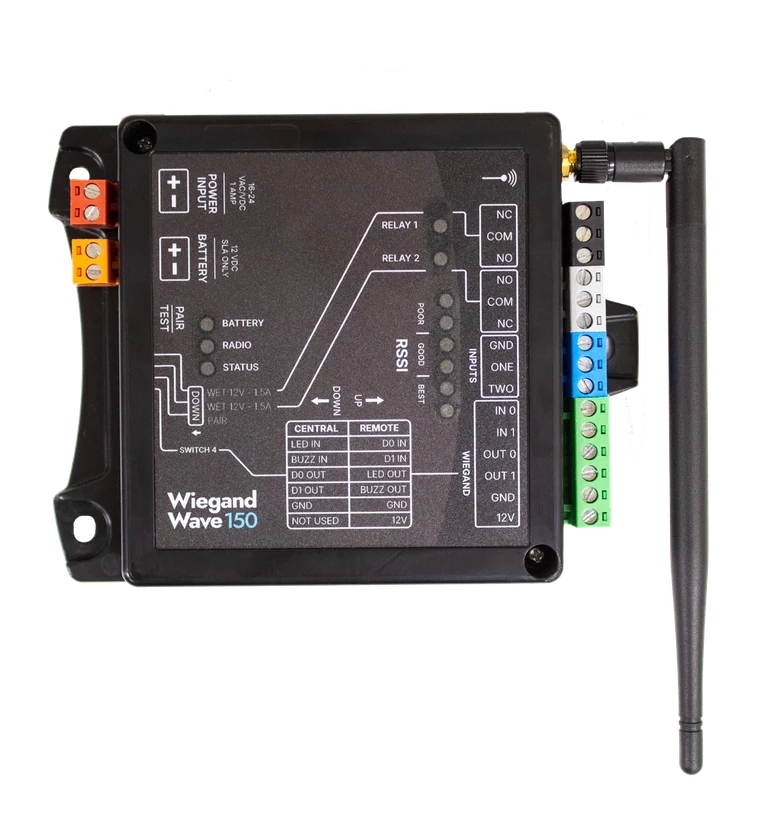
Start at the LEDs
The LEDs are the whole readout on the unit, and they narrow a fault before anything comes off the wall.
| LED | In normal operation | On |
|---|---|---|
| RSSI | The count is the signal strength. On the Wiegand Wave 150 they also light on each exchange, every 30 seconds once a pair is up. | Both products |
| Radio | Lights only while the unit is transmitting over the radio. | Both products |
| Status | On a KNECT Endpoint the blink pattern gives the pairing state, in the table below. On the Wave it runs as a five-second heartbeat. | Both products |
| Battery | Lit when the unit is running on the optional 12V sealed lead acid battery rather than on its supply. | Both products |
| Relay 1 and Relay 2 | Each one lights while its relay is closed. | Wiegand Wave 150 |
| Status LED | What it means | What to check |
|---|---|---|
| Slow blink, once a second | The unit is running but not paired. | Pair it with its intended partner. |
| Fast blink, twice a second | Pairing is in progress. | Keep both units powered and in pairing mode. |
| Mostly on, with two brief dips each second | A partner is stored, but the radio is not synchronized. | Check that the partner unit is powered, then check range and antennas. |
| Steady on | Paired and synchronized. This is normal. | Use the test button to confirm the link is carrying data. |
| LEDs lit | What it means |
|---|---|
| 1 to 2 | Poor. An occasional 1 or 2 is fine, but a steady 1 or 2 is not a stable link. Review where the units and antennas are placed. |
| 3 to 4 | Good. |
| 5 or more | Best. |
A unit with no LEDs lit at all has no power. Start at the red terminal block rather than at the radio.
A link that never came up
A new install that has not paired. Work down the list, because the first three cost nothing to check.
- 1Both units are set to the same role. Switch 4 down at the panel, up at the door or gate. Two units set the same way will not pair, and the Central unit's RSSI LEDs stay dark because nothing is transmitting to it.
- 2The roles were set on a powered unit. Each unit reads its role at startup, so a switch moved while it is running does nothing until it restarts. Unplug both for 30 to 60 seconds and try again.
- 3The pairing procedure is not the same on both products. A Wiegand Wave pair goes into pairing mode on DIP switch 3. A KNECT pair does not have that switch and pairs on a power cycle and the Pair/Test button. Running the wrong one leaves both units untouched.
- 4The antenna is not on, or not tight. It has to be screwed down far enough that it cannot swing. This is also the most common reason a link tests fine on the bench and poorly on the wall.
- 5One unit has no power. The status LED is the fastest check. A unit with no LEDs at all is a power problem rather than a radio one, so start at the red block.
The full procedure for each configuration is in its own guide: Point to Point installation guide, One to Many installation guide, Wiegand Wave 150 installation guide.
A link that worked and stopped
A system that ran and now does not. Something in the path or the power changed, so start with what is different.
- 1The antenna moved. Someone bumped it, or it worked loose over time. Check it is still tight and still pointing up.
- 2Something was built between them. A new wall, a vehicle parked where nothing used to park, a container, or a gate that now sits closed where it used to sit open. Metal in the path costs more than distance does.
- 3A unit is in a metal enclosure. A can around the unit confines the antenna. If a job needs the board in metal, the KEP-203 is the version built for it, with the antenna outside.
- 4Weather reached it. Neither product is water resistant. Outdoors both need an enclosure, with the antenna outside it.
- 5It is running on battery. If the battery LED is lit, the supply has gone and the unit is on backup. Fix the supply before anything else.
Credentials are not reaching the panel
The radio is up, the RSSI LEDs are lit, and a card read still does nothing. That is a wiring question rather than a signal one.
- 1The two units are wired for the opposite roles. This is the one that looks like a dead unit and is not. The units are identical, and each role lands a different set of terminals. The Central and Remote wiring guide has both.
- 2The reader is on the wrong terminals. The two roles use the same six Wiegand terminals for different things. Read the table printed on the face rather than matching positions between the two units.
- 3A relay is set wet where the job needs dry. Switches 1 and 2 set each relay independently. Dry is a plain switch. Wet puts out 12V at up to 1.5A.
- 4The lock is on the wrong relay contact. Both relays run NC, COM, NO. A lock landed on NC where the job needs NO, or the other way round, releases when it should hold.
Where to read the signal
The same reading is available on the unit, on a phone beside it, and from a desk. Which one you want depends on where you are standing.
On the unit
The RSSI LEDs, with the unit in front of you. Press Pair/Test and both units strobe if the link is up. On a KNECT Endpoint or Gateway, the test button also beeps when the test packet gets through.
In the KNECT Tech app
Over Bluetooth, standing next to the device. Live status and the diagnostic fields, without opening the enclosure.
In the Aether RF IoT portal
From a desk, across every site you have installed, with history. This is how a marginal link gets caught before it becomes a call-out.
The Wiegand Wave 150 has no cloud connection and cannot be claimed to the portal, so its reading is the LEDs on the unit.
What to check before a return
Most units that come back working turn out to be one of these. Each is a check on site rather than a shipment and a second trip.
- Both units powered, and both power cycled since the last switch change
- Switch 4 down at the panel and up at the door or gate
- The pair run through the procedure for that product, since the Wave and the KNECT line pair differently
- Each unit wired for the role it is set to, against the table printed on its face
If all four check out and the link still won't come up, call product support before you send a unit back.
If it still isn't working
Aether RF product support takes calls from installers directly, so you don't need to go through your distributor first. If you're on site with the units in front of you, calling is fastest.
Weekdays, 8:30am to 5:30pm Arizona time. Have the serial number and the RSSI reading ready. Send a support request instead.