
How One to Many works
Two to eight doors and gates, one KNECT system
One to Many puts several doors and gates on one system. A KNECT Gateway wires to the access panel, an ARF Tether holds its radio, and a KNECT Endpoint goes at each door or gate.
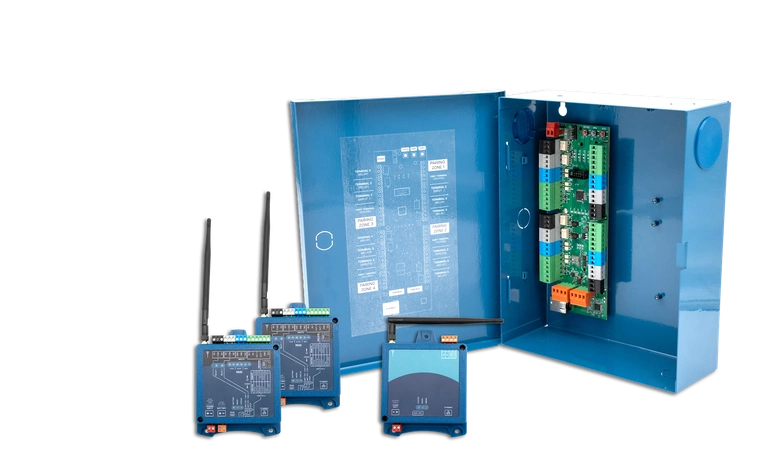
How the doors link to one Gateway
Every KNECT Endpoint links straight to the ARF Tether, the Gateway's radio. The system fans out from one point, so each door or gate gets the same range.
- At the panel
- The Gateway wires to the panel the way a reader would, and takes 12 VDC from it
- The radio
- On the ARF Tether, up to 400 feet of cable from the Gateway
- At each door
- A KNECT Endpoint, wired to the reader and the lock
- Range
- The same at every door, however many Endpoints are on the system
Walking the site before you bid
Four decisions, in the order you make them on a One to Many site walk.
- 1 Count the doors
- A Gateway runs up to four doors and gates, and eight with a second Gateway.
- 2 Find the panel
- The Gateway mounts at the access panel and takes its power from it.
- 3 Place the antenna
- The Tether mounts up to 400 feet from the Gateway, so put it where it sees the most doors.
- 4 Check the protocol
- A Gateway runs Wiegand. OSDP readers need the KGW-H OSDP Hat on the order.
Each Endpoint pairs with the DIP switches on the unit or through the portal, and its signal reads on the unit and in the KNECT Tech app. One to Many installation guide
One system or separate pairs
Separate Point to Point pairs put a Central unit at the panel for every door. One to Many puts one Gateway and one Tether there for up to four.
- One connection at the panel
- One Gateway wires to the panel, where separate pairs need a unit and a termination for each door.
- A new door is one Endpoint
- Add a KNECT Endpoint and pair it. The rest of the system stays as it is.
- One antenna to place
- You place one Tether for the whole site, and every door links back to it.
How far a One to Many system grows
Four doors and gates to a Gateway. Past that, add a second Gateway, then a second system.
- Up to four
- One Gateway, one Tether, and an Endpoint at each door or gate
- Five to eight
- Add a second Gateway. Both boards fit in one enclosure, and one Tether serves both
- Nine or more
- Put a second system beside the first. One property can have as many as it needs
- Past four
- Send Aether RF the doors and gates and how far each one is from the panel, and we'll lay the parts out
Product support is (602) 396-4186, weekdays 8:30am to 5:30pm Arizona time.
When to use something else
One to Many fits two or more doors and gates on a site with an access panel. These jobs need a different Aether RF product.
- One door or gate
- Two KNECT Endpoints cover it without a Gateway or a Tether. Point to Point
- No access panel
- A Gateway wires to an access panel and can't act as one. KNECT Core Access (coming soon) makes the decision itself.
What to order for two to eight doors
Most One to Many jobs start with the One to Many Kit, which covers two doors or gates. Add a KNECT Endpoint for each one after that.
One to Many Kit
OTM-KA Gateway mounted in its enclosure, an ARF Tether and two Endpoints, with the transformers they need.
KNECT Endpoint
KEP-200One for each door or gate past the kit's two.
KNECT OSDP Hat
KGW-HOnly for OSDP readers. It mounts on the Gateway board.
KNECT Gateway
KGW-100A bare board, for a second Gateway past four doors or to replace one.
Questions before you order?
Aether RF product support is (602) 396-4186, weekdays 8:30am to 5:30pm Arizona time.
Or book a product consultation, opens in a new tab to talk through the job and lay out the system with the Aether RF team.