
How Point to Point works
One door or gate, two KNECT Endpoints
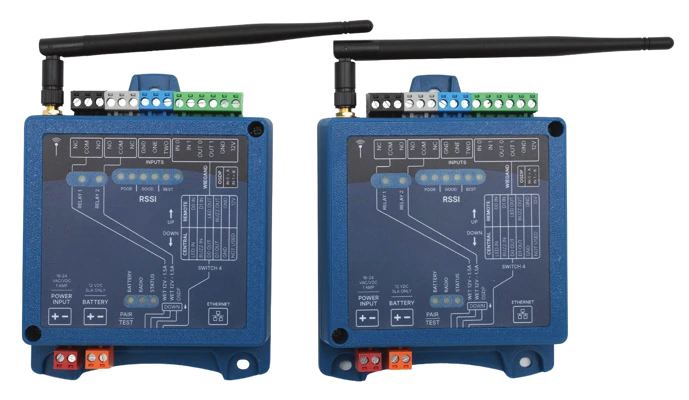
Point to Point covers one door or gate the wire can't reach. One KNECT Endpoint wires to the access panel, a second one wires to the reader and lock, and the two link by radio. There's no Gateway or Tether to buy.
What goes where
Both Endpoints are the same part. Switch 4 on each one sets its role, and the role decides how it's wired.
- The Central
- Wires to the access panel the way a reader would
- The Remote
- Wires to the reader, and its relay releases the lock or opens the gate
- Pairing
- DIP switches on the units, in under ten minutes, with no laptop
- Power
- 15 to 24 volts AC or DC at each unit, with an optional 12V battery
Walking the site before you bid
Three things decide whether a Point to Point link fits the job, and all three are visible on the site walk.
- The panel and the door
- One Endpoint mounts near the access panel and the other at the door or gate. Each one needs power where it mounts.
- What's between them
- Open ground, housing and concrete are three different jobs at the same distance, so plan where each antenna goes. How far a KNECT link reaches
- The reader's protocol
- An Endpoint handles Wiegand at 4 to 64 bit, OSDP, or two relays, so you order the same part whatever the reader uses.
A KNECT Endpoint isn't weather tight, so outdoors it goes in a weatherproof enclosure. Keep the antenna out of metal. The KEP-203 comes fitted in a can with the antenna mounted outside it.
Pairing and checking the link
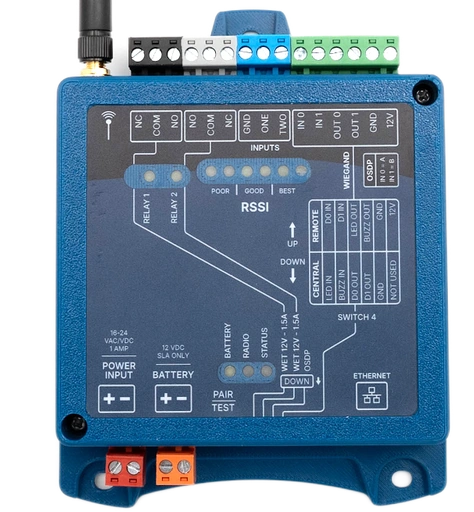
Everything you need to pair a KNECT Endpoint and check the link is printed on its face.
Switch 4 sets the role
Set one unit to Central and the other to Remote. The face prints a wiring table for each role. A Central and Remote wired the wrong way round is the most common reason a working pair gets sent back.
The signal reads on the unit
A POOR to BEST scale on the face lights up with the link's strength, so you can confirm it before you pack the ladder. The KNECT Tech app reads the same thing over Bluetooth.
Anyone can re-pair it later
Pairing happens on the units, so whoever services the site years from now can swap or re-pair a unit without software.
When to use something else
Point to Point fits one door or gate on a site with an access panel. These jobs need a different Aether RF product.
- Two or more doors
- A separate pair at each door means placing a radio at the panel for each one. One to Many runs up to four from one Gateway, and eight with two.
- No access panel
- An Endpoint extends an access panel and can't act as one. KNECT Core Access (coming soon) makes the decision itself.
- Wiegand only, no portal
- The Wiegand Wave 150 uses the same radio for less. It has no OSDP and no Ethernet, so it can't be claimed to the portal.
What to order for one door or gate
Most Point to Point jobs need one KEP-202 pair. Aether RF ships the KNECT Endpoint three ways.
KNECT Endpoint, pair
KEP-202Two Endpoints, two transformers and two antennas. A complete Point to Point link.
KNECT Endpoint, single
KEP-200One Endpoint, one transformer and one antenna, to replace one unit in a pair.
KNECT Endpoint in Enclosure
KEP-203One Endpoint fitted in a can, with the antenna mounted outside it.
Questions before you order?
Aether RF product support is (602) 396-4186, weekdays 8:30am to 5:30pm Arizona time.
Or book a product consultation, opens in a new tab to talk through the job and lay out the system with the Aether RF team.